
Rechargeable AR glasses batteries need safer design. The key is achieving acceptable runtime without causing thermal discomfort—especially since face-worn devices are in direct contact with the user’s head, requiring battery operating temperatures to stay below 40°C—or leading to swelling risks, hinge fatigue, charging hazards, or certification issues. This challenge arises because face-worn products combine various constraints: low weight, thin geometry, bursty power demand, repeated mechanical stress, limited heat dissipation, sweat exposure, and low user tolerance for skin-contact heat. Therefore, buyers must assess pack architecture, current capability, thermal pathways, protection logic, and supplier validation quality before approving any compact battery for smart glasses.
A safer decision usually starts with one question: should the energy stay fully onboard, or should the smart glasses power system be split across the frame, a charging case, a neckband, or a tethered wearable device battery pack? The wrong answer often looks fine in a sample build and fails later in field use.
Why AR smart glasses battery safety becomes the real design bottleneck
An AR smart glasses battery is harder to approve than a phone battery because the pack sits against the head, inside a narrow structure with poor airflow and constant mechanical movement. A battery that appears strong on paper can still become the source of resets, hot spots, swelling, or charging complaints in actual use.
Public product evidence points in the same direction. Meta states current AI glasses can deliver up to 5 hours of continuous audio playback, up to 8 hours of typical use, and rely heavily on charging-case support rather than trying to push unlimited onboard runtime. That is an important signal for buyers evaluating a rechargeable battery for AR glasses: commercially viable products often accept a limited internal pack and shift some energy storage off the face through the charging ecosystem. See Meta’s battery guidance on AI glasses battery life.
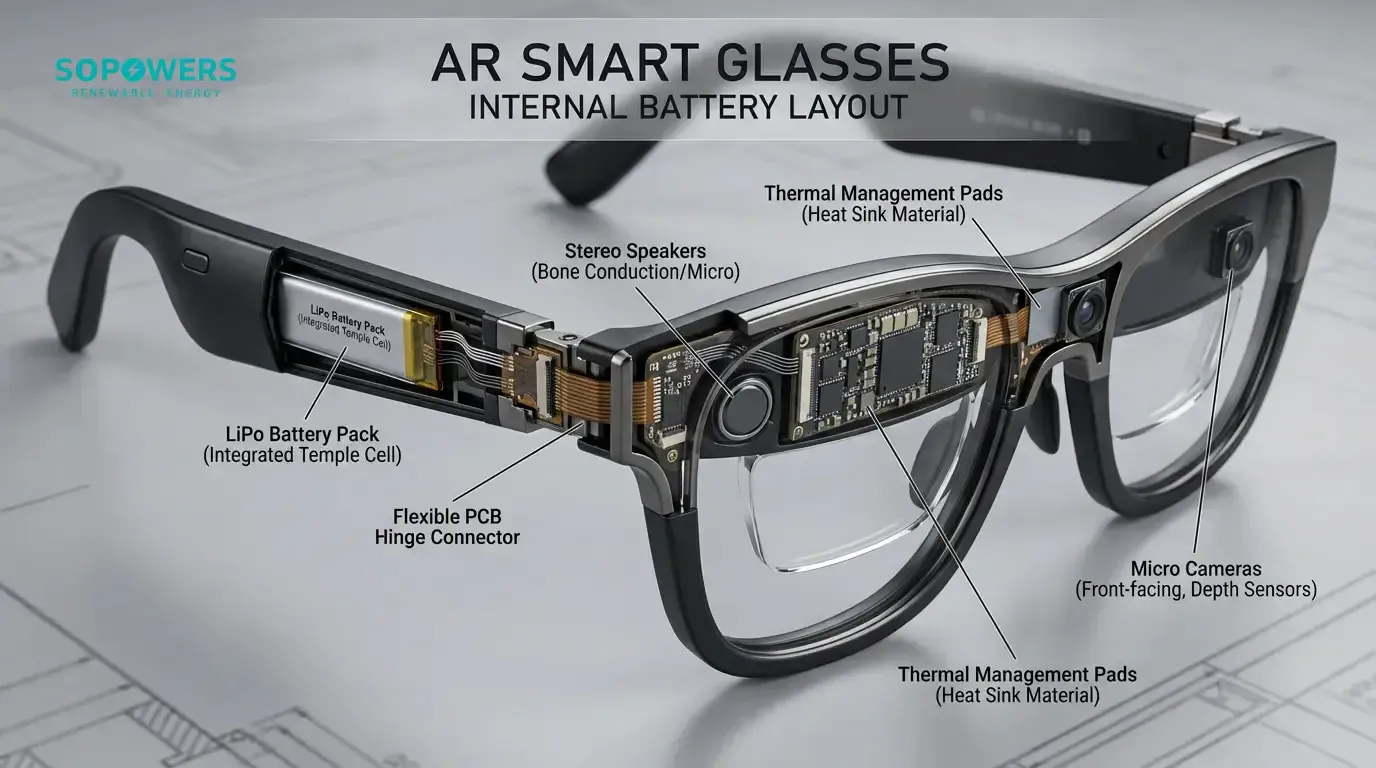
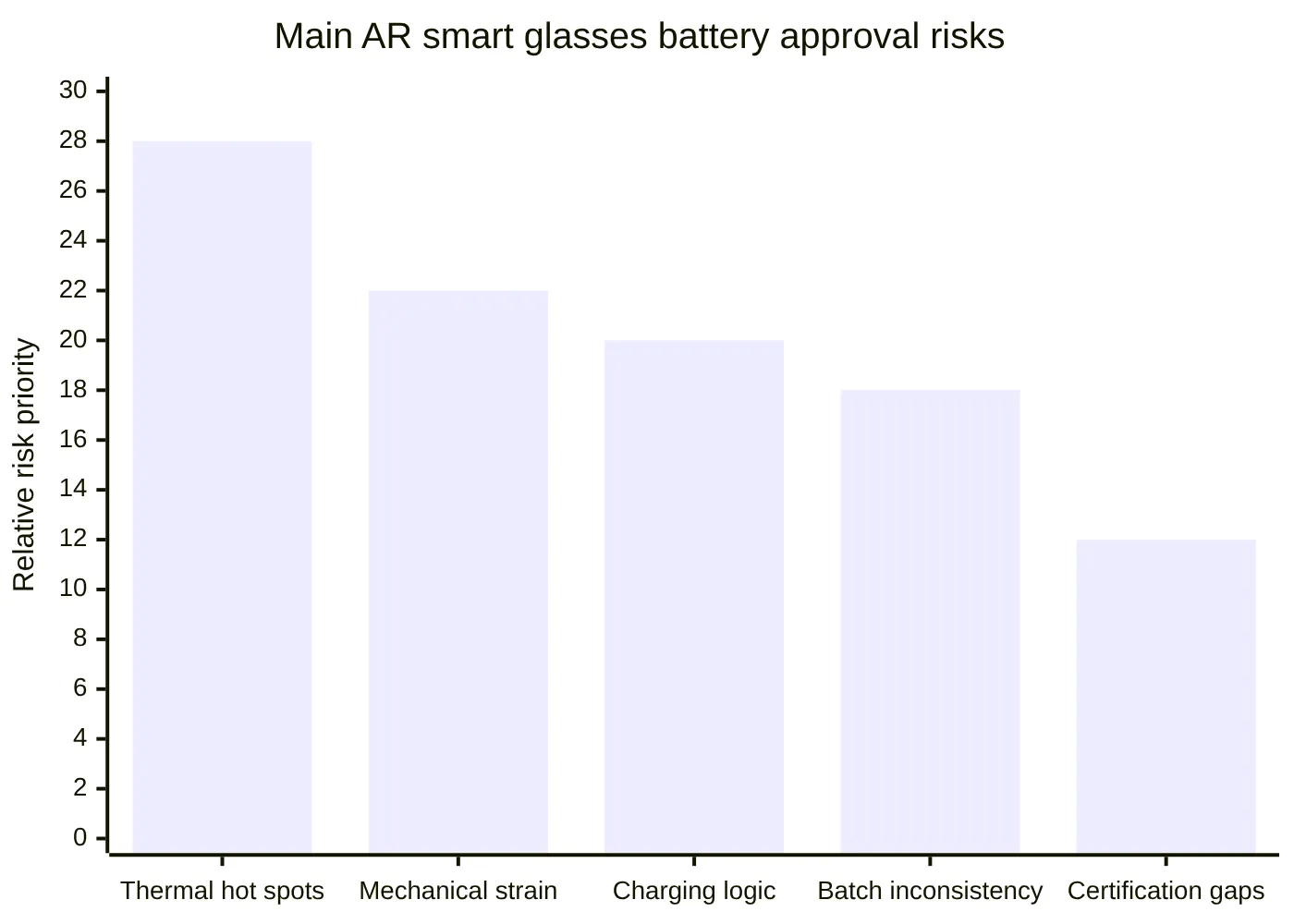
What buyers usually miss is that the danger is rarely just “battery capacity too low”. The real failure pattern is mismatch:
- Too much energy in too little thermal volume
- Too much charge speed for a skin-contact device
- Too little mechanical margin near hinges and cable exits
- Too much trust in cell-level claims instead of pack-level proof
- Too little screening for batch inconsistency
If your team is sourcing a high energy density wearable battery, the right question is not “What is the highest mAh available?” It is “What runtime can we support safely under our actual duty cycle?”
How to evaluate an AR smart glasses battery under real operating conditions
The best way to evaluate an AR smart glasses battery is to start from the power profile, not the nominal capacity number. Runtime claims can look attractive and still mislead the buyer if they ignore peak loads, low state-of-charge behavior, or thermal throttling.
Sopowers outlines this logic in its AI smart glasses battery guide: if average power is about 0.35 W for 4 hours, the energy need is roughly 1.4 Wh, or about 378 mAh at 3.7 V before margin. Once realistic reserve is added, the design target can move toward 450 to 500 mAh total. That is far more useful than approving a supplier based on one headline spec.
Realistic spec window for a compact battery for smart glasses
| Parameter | Plausible window | Why it matters |
|---|---|---|
| Battery configuration | Usually 1S Li-ion or LiPo | Simpler charging and protection architecture |
| Internal pack capacity | Roughly 150 to 500 mAh total | Slim glasses claiming much more need strong proof |
| Average power draw | A few hundred mW in light mixed use | Runtime claims depend heavily on workload |
| Peak load behavior | Must survive camera, AI, and radio bursts | Weak current capability causes resets and brownouts |
| Charge strategy | Usually conservative | Fast charge raises thermal and cycle-life risk |
| Runtime expectation | Often 2 to 8 hours depending on use model | “All day” usually implies standby or case support |
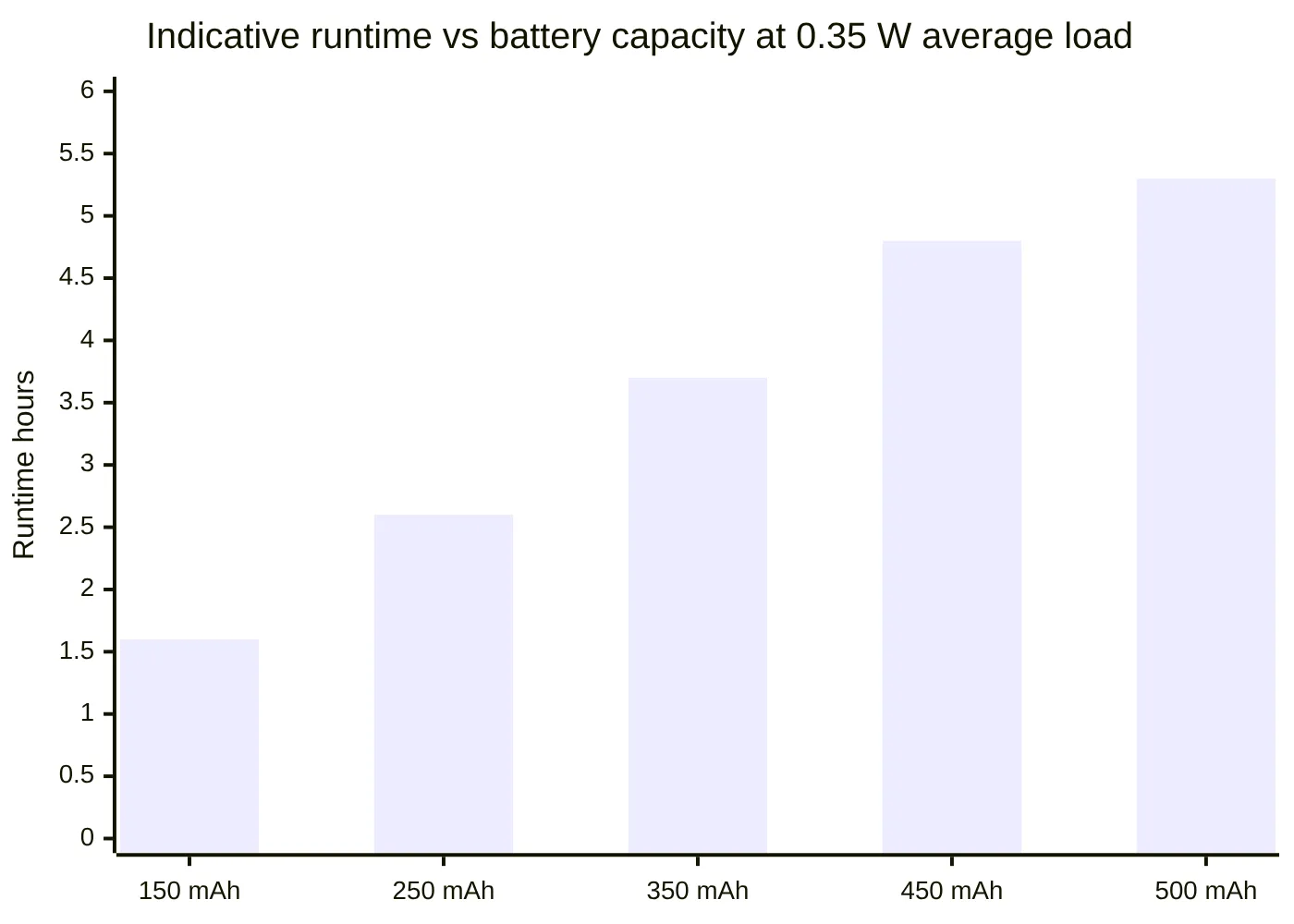
This is where sourcing teams get misled. A compact battery for smart glasses may deliver the rated capacity in a gentle bench test, then collapse under real burst loads because internal resistance is too high. The result is voltage sag, unstable wireless performance, or device reboots before nominal energy is actually usable.
What to ask the supplier before approval
Use this checklist in RFQs and design reviews:
- What is the nominal and minimum delivered pack capacity?
- At what current, temperature, and cutoff voltage was it measured?
- What are the continuous and peak current limits?
- Can the supplier show pulse-load discharge curves?
- What is the temperature rise during charging and during peak use?
- What are the overcharge, over-discharge, and short-circuit thresholds?
- What swelling margin is designed into the enclosure?
- What is the allowed bend radius near cable exits and hinge areas?
- Is UN 38.3 documentation available for the exact battery type?
- What lot-level consistency screening is performed in production?
For buyers that need a more structured qualification process, Sopowers’ workflow is useful because it starts with solution matching and technical confirmation, then moves through factory testing and consistency screening, and continues with post-delivery troubleshooting support. You can review relevant options through the product page or contact the team.
Which AR smart glasses battery architecture is actually safer
For most teams, the safer AR smart glasses battery decision is architectural, not chemical. A wearable electronics battery design can be technically impressive and still be commercially risky if it forces all runtime into the frame.
There are several viable architectures, and each one trades off runtime, comfort, and safety differently.
Comparison table: safer smart glasses power system options
| Design option | Runtime potential | Safety margin | Main hidden risk | Best use case |
|---|---|---|---|---|
| Single internal pouch pack | Medium | Moderate to low | One-sided heat and swelling concentration | Lightweight consumer smart glasses |
| Split left and right packs | Medium | Moderate | More interconnect and routing complexity | Premium balanced eyewear designs |
| Small internal pack plus charging case | Medium at system level | High | Short standalone runtime | Consumer products with intermittent use |
| External wearable device battery pack | High | High | Cable snag and connector wear | Industrial AR and long sessions |
| Neckband pack | High | High | Added accessory complexity | Enterprise guided-workflow devices |
| Battery-free host-powered glasses | Low onboard, high via host | Very high in-frame | Cable dependence | Display-first smart glasses |
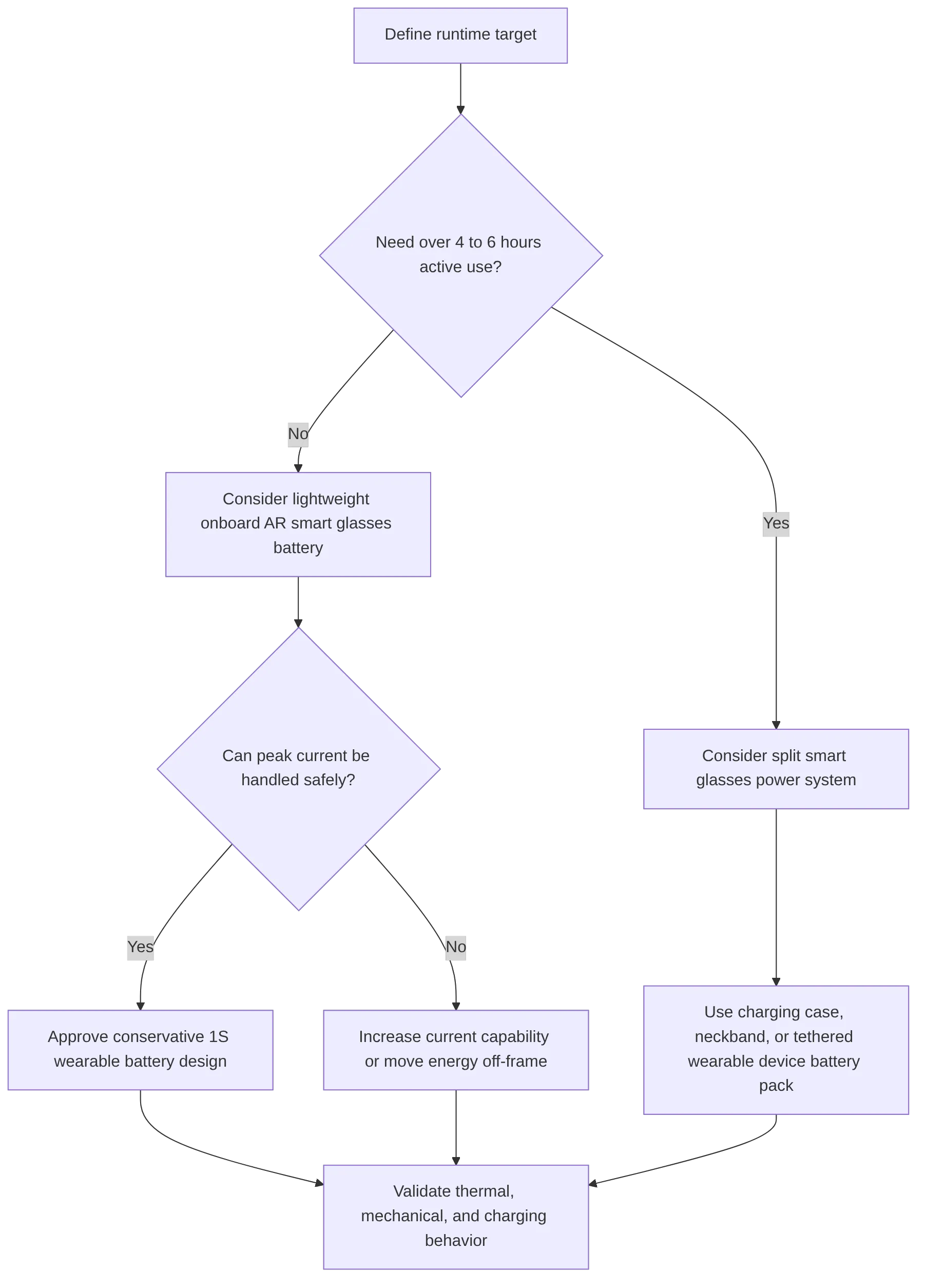
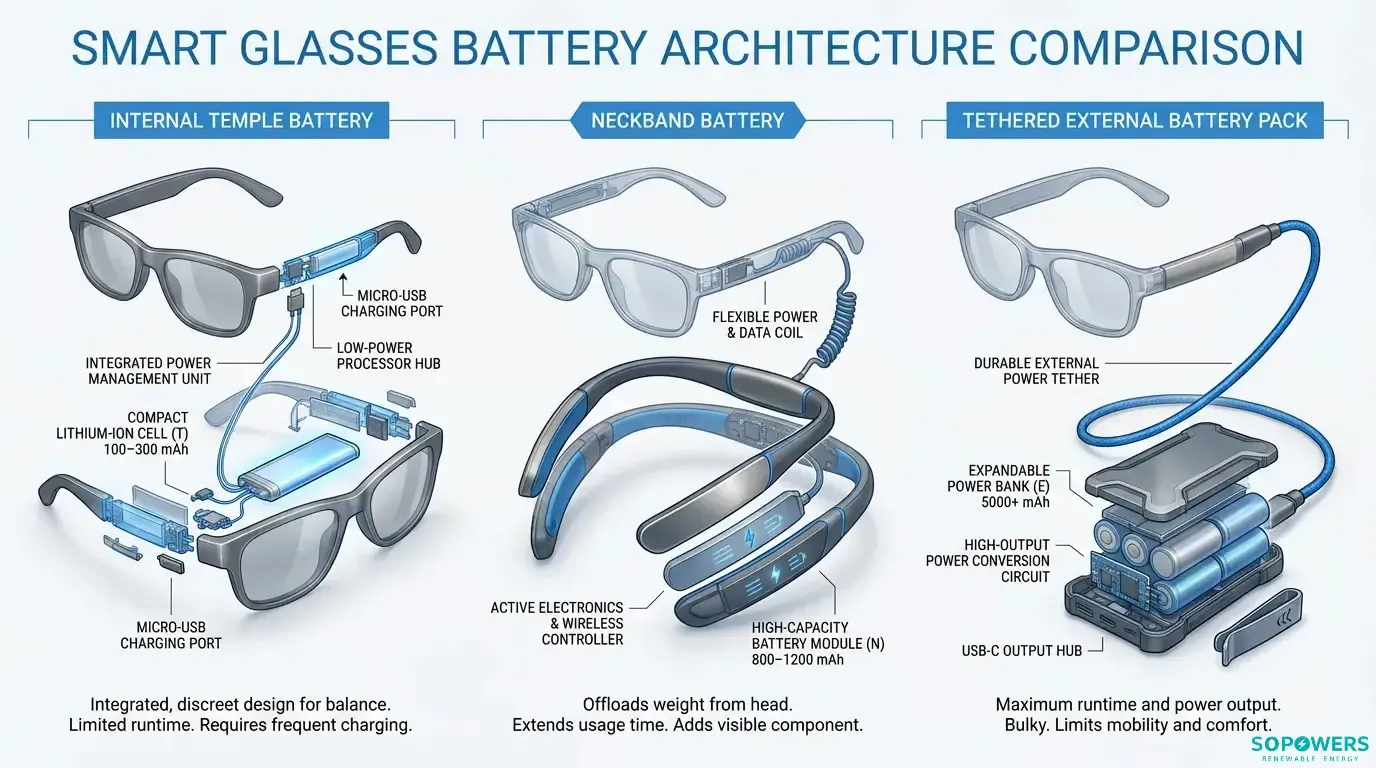
If the product must support long active sessions, a split architecture is often safer than forcing a larger internal battery into the frame. This is especially true when the compact battery for smart glasses must also support cameras, wireless uplink, or AI processing bursts.
That is why “high energy density wearable battery” should never be treated as a standalone win. Higher density often reduces mechanical and thermal margin. In a face-worn product, that trade-off matters more than in a phone or a handheld device.
Where rechargeable battery for AR glasses projects usually fail
Most rechargeable battery for AR glasses projects do not fail because teams forget capacity. They fail because they underestimate system-level interactions between current, heat, charging, and structure.
Three failure clusters appear repeatedly.
1. Thermal and charging risk
Fast charging sounds attractive, but it can become a risk multiplier in eyewear. Face-worn devices have less thermal mass and less tolerance for hot spots near skin. UL’s AR, VR, and MR testing guidance reflects the fact that these products need safety evaluation beyond conventional electronics assumptions.
Common problems include:
- Charging while the pack is already warm from use
- Temperature sensing that is too slow or poorly placed
- Hot spots concentrated in one temple
- Contact charging systems that degrade under contamination
- Aggressive charge rates that shorten cycle life
2. Mechanical damage and hinge strain
A smart glasses power system is mechanically fragile by definition. The battery may be thin, but the product is opened, closed, dropped, and worn in humid conditions. That creates real risk around:
- Hinge torsion
- Cable fatigue
- Screw intrusion
- Adhesive creep
- Swelling pressure against rigid parts
- Shell deformation during assembly or repair
3. Supplier inconsistency
One good prototype means very little if production spread is uncontrolled. Small differences in internal resistance can create visible differences in runtime, charging heat, and low-SOC stability across batches. Buyers should ask for capacity spread, IR spread, traceability, and corrective-action procedures, not just sample performance.
This is where Sopowers can add practical value. Before delivery, the team provides solution matching and technical confirmation based on application scenario, including capacity, voltage, power rating, and feasibility assessment. During delivery, all batteries go through factory testing and consistency screening. After delivery, the company supports troubleshooting and root-cause analysis if voltage sag, heating, or abnormal field behavior appears. For technical buyers, that process discipline matters more than polished marketing claims. If you are comparing sourcing options, use Send Inquiry only after you have defined the actual duty cycle and architecture constraints.
How to approve an AR smart glasses battery without buying hidden risk
The safest way to approve an AR smart glasses battery is to reject impossible combinations early. If a supplier promises ultra-thin geometry, high capacity, fast charging, low temperature stability, and perfect comfort all at once, that is usually the moment to ask for proof instead of pricing.
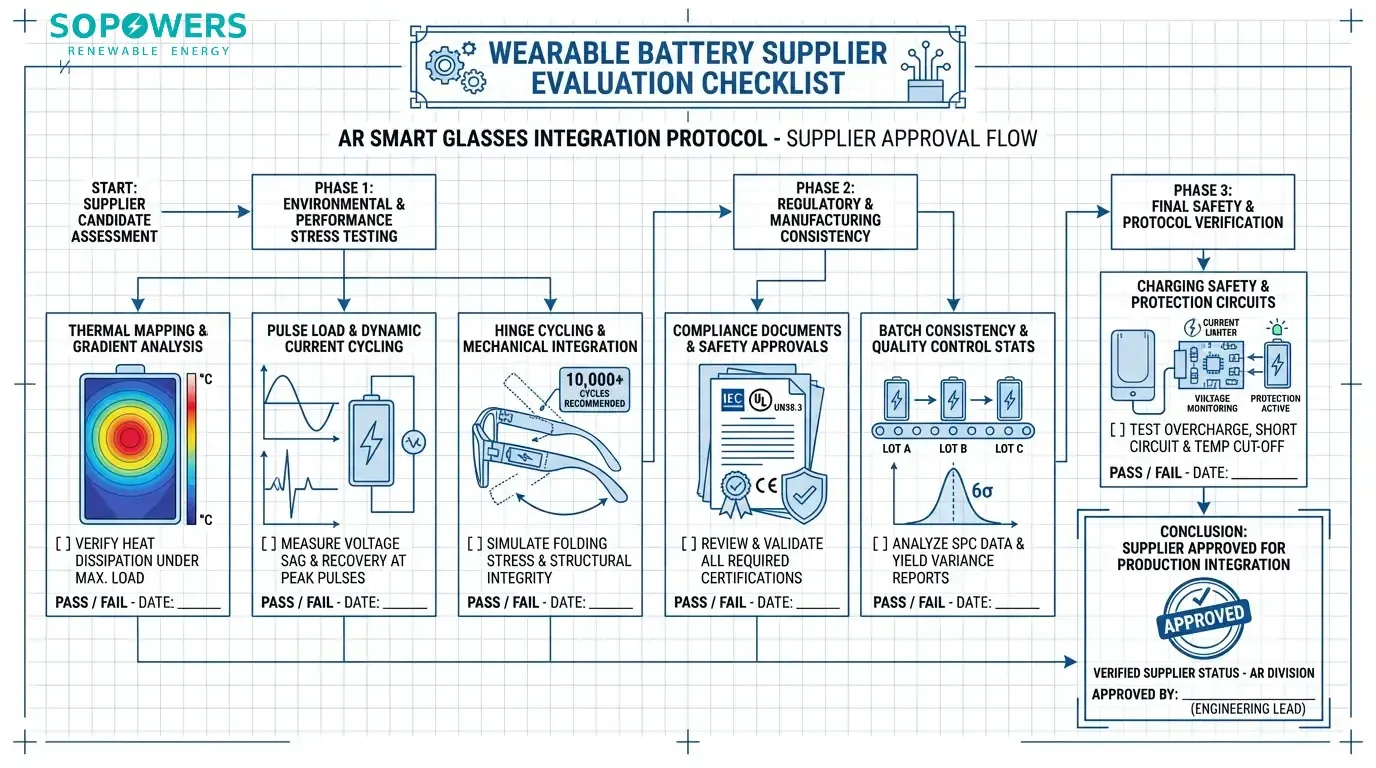
A practical buyer approval framework looks like this:
Approval checklist for wearable electronics battery design
- Define real use conditions
- Idle, mixed use, peak burst, warm charge, low-temperature start
- Separate cell claims from pack reality
- Ask for pack dimensions, protection design, insulation stack, and reinforcement details
- Validate pulse-load behavior
- Require voltage sag data across temperature and state of charge
- Verify thermal behavior on-body
- Average temperature is less important than hot-spot location
- Treat fast charge as optional until proven safe
- Charging speed is not worth field failures in eyewear
- Make mechanical validation a gating item
- Hinge cycling, bend radius, swelling allowance, and drop response are essential
- Check compliance and shipping readiness early
- Review IEC 62133-2 overview, UN 38.3 transport guidance, and relevant UL standards resources
If your team is still comparing options, a useful next step is to review Sopowers’ broader high energy density battery solutions and product portfolio alongside the brand’s AI smart glasses battery guide. The goal is not to buy the biggest battery. It is to approve a design that can survive actual use, documentation review, and post-launch support.
In short, safer AR smart glasses battery design means accepting that runtime, comfort, and risk are tied together. The best buyers start with the duty cycle, choose the safest practical architecture, and demand pack-level evidence before locking the design.
If you need help evaluating a rechargeable battery for AR glasses, validating a compact battery for smart glasses, or reviewing a full smart glasses power system, contact Sopowers for technical consultation.


